Alvez: A Bold Display Font for Modern Web Design
As a UI designer who ships dozens of landing pages, SaaS dashboards, and e-commerce experiences each year, I pay close attention to how type performs—not just how it looks. Alvez stands out in my font library because it delivers visual impact without sacrificing clarity or intention. It’s not just decorative; it’s functional typography built for digital contexts where hierarchy, speed, and brand tone matter.
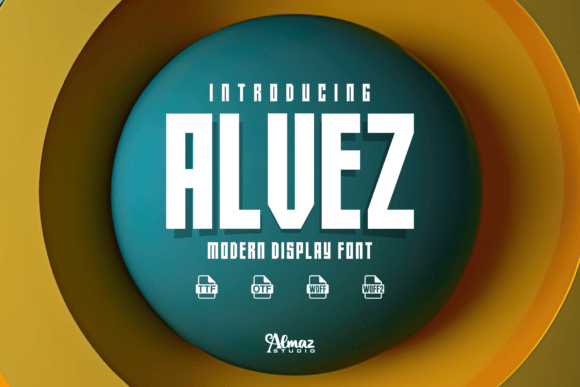
Alvez is a contemporary display font—designed specifically for emphasis, not extended reading. Its clean lines, confident stroke contrast, and balanced proportions give it a polished, almost architectural presence. Unlike overly condensed or exaggerated display fonts, Alvez maintains legibility even at smaller sizes (down to ~32px on desktop, ~28px on mobile with sufficient line spacing). That makes it unusually versatile for a display typeface: ideal for hero headlines, product name tags, CTA buttons, and logo lockups—but less suited for body copy or long-form interface labels.
In real-world layouts, Alvez strengthens visual hierarchy instantly. On a coaching website’s hero section, pairing Alvez for the headline (“Transform Your Workflow”) with a neutral sans serif like Inter or Manrope for subhead and paragraph creates clear information architecture—users scan the bold title first, then descend naturally into supporting content. The same principle applies to online store banners: “Limited Edition Drops” in Alvez draws attention faster than generic system fonts, while still feeling intentional and premium—not gimmicky.
For conversion-focused areas—like pricing cards, feature highlights, or email signup headers—Alvez adds subtle psychological weight. Its boldness signals confidence and authority, which supports trust-building on service-based sites or course sales pages. I’ve used it successfully for section headings on portfolio sites (e.g., “Work”, “Process”, “Clients”) where consistency and tone reinforce creative professionalism without needing illustration or iconography.
Readability holds up across devices when applied thoughtfully. On mobile, I limit Alvez to single-line headlines or short CTAs (e.g., “Get Started”, “Join Now”) and always test against both light and dark backgrounds. Its open counters and generous x-height prevent crowding on small screens. Over image overlays, I add subtle text shadows or semi-transparent background bars—never rely solely on contrast alone. For dark mode interfaces, Alvez’s strong glyph structure ensures it remains distinct without washing out.
Font pairing is where Alvez shines most. As a display font, it works best alongside highly legible, low-contrast sans serifs for UI text and body copy—think Inter, IBM Plex Sans, or Open Sans. These pairings keep interfaces scannable and accessible while letting Alvez carry expressive weight. For editorial or boutique brand experiences (e.g., a ceramicist’s online shop or an independent magazine), I’ll occasionally pair Alvez with a restrained serif like Literata or Lora—but only for headings over rich, static visuals, never for interactive elements.
Alvez includes multiple weights (Light, Regular, Bold, Black), true italics, and extended Latin character support—including accented characters for Spanish, French, German, and Portuguese. That matters for global-facing SaaS products or multilingual blogs. All webfont formats (WOFF2, WOFF) are included, and variable font options may be available depending on your license—check the distribution package. No alternates or stylistic sets clutter the set, which keeps implementation simple and load times lean.
Licensing is practical and transparent: Alvez is a commercial font, meaning you’ll need a web license for live sites, client projects, or digital templates sold on marketplaces. One license typically covers unlimited pageviews and domains under a single brand—ideal for agencies managing multiple client sites or creators selling Notion templates or Figma kits. Always verify usage rights for embedded use in apps or PDF exports, especially for white-labeled tools or downloadable brand assets.
I reach for Alvez when I need to communicate sophistication without complexity—on a fintech dashboard’s welcome banner, a wellness app’s onboarding step, or a design agency’s case study header. It avoids the sterility of ultra-thin fonts and the fatigue of overused bold grotesques. Its personality is calm but commanding: modern, human-scaled, and quietly confident.
It’s also effective in motion. In micro-interactions—like hover states on navigation items or animated section reveals—Alvez’s consistent rhythm holds up well. Just avoid scaling it beyond 150% in CSS transforms; its geometry stays crisp, but optical balance shifts at extremes.
For bloggers adding branded graphics to social posts or newsletter headers, Alvez adds polish fast. A single-word blog title (“Clarity”, “Anchor”, “Momentum”) set in Alvez over a muted gradient becomes instantly recognizable—no logo needed. And because it’s optimized for screen rendering, it looks sharp on Retina displays and doesn’t pixelate in SVG exports used for digital ads or email banners.
Ultimately, Alvez isn’t about novelty—it’s about precision. It solves real web design problems: establishing tone quickly, guiding attention deliberately, and unifying brand expression across touchpoints—from a product landing page to a mobile app splash screen to a Shopify collection banner. When every pixel serves purpose, a well-chosen display font like Alvez becomes infrastructure, not decoration.
If you’re selecting fonts for a new digital product, redesign, or brand kit, treat Alvez as a strategic asset—not just another aesthetic choice. Test it early in your design system: apply it to your primary H1, your main CTA, and your logo placeholder. See how it shapes rhythm, trust, and clarity. You’ll notice the difference before the first user does.