Digital Caliper: A Futuristic Display Font That Cuts Through the Feed
It was 2 a.m. during a final round of edits for a new online course launch—three Instagram carousels, two YouTube thumbnails, and a set of Pinterest pins all needed that “launch energy.” I opened the headline layer in Figma, typed “Enroll Now — Doors Open Friday”, and cycled through fonts. Then I dropped in Digital Caliper. Instantly, the text felt like it belonged on a sci-fi interface—clean, precise, quietly confident. Not flashy. Not gimmicky. Just unmistakably *now*.
A Typeface Built for Digital First Impressions
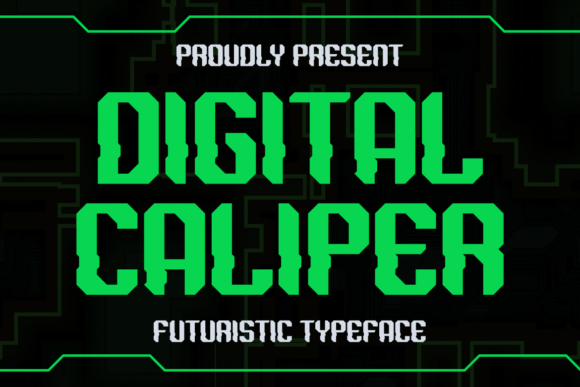
Digital Caliper is a display font—not meant for paragraphs or body copy, but engineered for moments where your message has under two seconds to land. Its design nods to digital calipers: sharp terminals, measured spacing, subtle geometric precision, and a restrained tech aesthetic. Think less “neon cyberpunk,” more “lab-grade UI element.” It’s cool without trying too hard—no excessive glitches, no forced distortion. Just clarity with character.
In practice, that means Digital Caliper thrives where attention is fragmented and context is visual: Instagram story overlays, YouTube thumbnail titles, email banner headers, or even the “Limited Time” badge on a Shopify promo banner. It communicates modernity not through trend-chasing, but through intentionality—like the typeface equivalent of a well-calibrated sensor.
Where It Shines (and Where It Steps Back)
We tested Digital Caliper across six campaign assets over a two-week content sprint:
- YouTube thumbnails: Stood out sharply at 120px width—even with bold color overlays and tight cropping. The letterforms held their shape without blurring or pixelation.
- Instagram Reels covers: Paired with a muted gradient background, its clean weight created instant hierarchy. Viewers scanned the title first, then the supporting line in a secondary sans serif—no hesitation.
- Pinterest pins: Worked especially well for “How-To” or “Tool Spotlight” verticals. Its technical vibe subtly reinforced credibility for design tools and digital workflows.
- Email banners (desktop + mobile): Scaled cleanly down to 24px on mobile previews—still legible as a headline, though we avoided using it below 20px.
- Webinar registration banners: Gave “Live Q&A” or “Expert Session” labels a polished, forward-looking tone—distinct from generic sans serifs used elsewhere in the brand system.
- Branded template packs: Clients consistently chose Digital Caliper for cover slides and section dividers—its presence signaled “this is intentional design,” not placeholder styling.
That said, Digital Caliper isn’t a universal solution. We quickly ruled it out for:
- Body text or captions—its narrow proportions and tight spacing reduce readability at small sizes.
- Formal client deliverables requiring conservative typography (e.g., annual report summaries or investor decks).
- Dark mode interfaces with low-contrast backgrounds—some weights lost definition unless paired with a subtle stroke or shadow.
- Multi-line quotes longer than 12 words—it’s a display font first, and its personality works best when breathing room is built in.
Smart Pairing, Not Just Styling
The real magic of Digital Caliper reveals itself in pairing. On its own, it’s striking—but in context, it becomes a strategic tool. Our go-to pairings:
- Clean sans serif (e.g., Inter, Manrope, or Montserrat): For subheads, bullet points, and CTAs. Creates a balanced tech-forward system—Digital Caliper sets the tone; the sans carries the message.
- Neutral serif (e.g., Lora or Literata): Surprisingly effective for contrast in editorial-style course landing pages—adds warmth without softening the core brand edge.
- Minimal script (e.g., Kumbh Sans or Raleway Light Italic): Used sparingly for signature lines or instructor names—adds human texture without competing.
Avoid pairing it with other high-contrast display fonts or overly decorative scripts—it’s designed to lead, not share the spotlight.
Practical Checks Before You Drop It In
Before locking Digital Caliper into a client project or branded template pack, we run five quick checks:
- Weight variety: Does the package include at least Light, Regular, and Bold? (Ours did—critical for hierarchy across platforms.)
- File formats: Are OTF and WOFF2 included? (Yes—essential for web use and design handoff.)
- Ligatures & alternates: Subtle ones exist—great for logo lockups or short campaign tags (“AI-Ready”, “Beta Launch”).
- Language support: Covers Latin Extended-A, so works for most European languages—but verify if you’re targeting Turkish, Vietnamese, or Central/Eastern European markets.
- Licensing clarity: Confirmed commercial use is covered—including social ads, digital products, and client work. No surprises at delivery time.
One note: while Digital Caliper feels premium, it’s priced accessibly for small teams—no enterprise licensing hoops. That makes it viable for consistent use across campaigns, not just one-off hero graphics.
Final Note: It’s Not About Looking Futuristic—It’s About Feeling Current
Fonts like Digital Caliper succeed not because they shout “innovation,” but because they reflect how audiences already experience digital space—fast, precise, layered, and quietly intelligent. It doesn’t try to be everything. It does one thing exceptionally well: give your boldest messages a voice that matches the moment.
So next time you’re building a thumbnail, prepping a launch graphic, or refining a branded template—ask yourself: does this headline need to be read, or felt first? If the answer leans toward *felt*, Digital Caliper is worth pulling up. Just remember to leave space for it to breathe—and let the rest of your typography do the heavy lifting.