Tiger Fingers: A Display Font That Elevates Digital Branding
It started with a hero section. I was refreshing the homepage for a small creative coaching practice — clean layout, warm photography, minimal navigation — and the headline just felt… safe. Too safe. The current sans serif was legible, but it didn’t reflect the bold, intuitive energy their sessions actually deliver. So I dropped in Tiger Fingers.
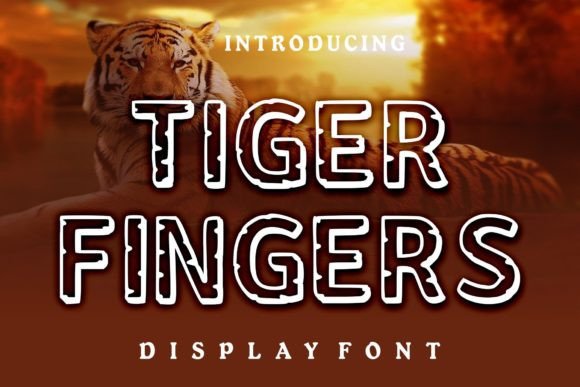
Instantly, the tone shifted. Not louder — sharper. Cooler. More intentional. Tiger Fingers is an outline display font with confident geometry, subtle angularity, and just enough personality to feel human without sacrificing polish. It’s not a script or handwritten font; it’s precise, architectural, and quietly assertive. Think of it as the visual equivalent of a well-tailored blazer over a t-shirt — effortlessly cool, grounded in craft.
In that hero section, I used Tiger Fingers at 48px on desktop and scaled it responsively to 36px on mobile. It held up beautifully over a soft gradient overlay — no stroke bleed, no pixelation. The open counters and generous spacing kept characters distinct even at smaller sizes, which matters when users are scanning on-the-go. On light backgrounds, it pops with clarity. On deep charcoal or navy, it gains quiet authority — especially with a subtle text shadow for contrast.
Tiger Fingers shines where impact matters most: hero headlines, section titles, CTA buttons, and campaign banners. I’ve used it for a boutique online store’s seasonal sale banner (“Summer Edit”), a course sales page’s core promise (“Build Your First Portfolio — No Code Needed”), and a digital brand kit’s cover graphic. In each case, it acted as a visual anchor — not competing with imagery, but framing it with intention.
That said, Tiger Fingers isn’t meant for body copy. It’s a display font, designed for short bursts of emphasis. Using it for paragraphs would fatigue readers and dilute its strength. Instead, I pair it with a highly legible sans serif — like Inter, Poppins, or even system fonts like -apple-system — for all supporting text. This pairing creates natural hierarchy: Tiger Fingers sets the mood and stakes the claim; the sans serif delivers the details with calm reliability. For more editorial projects — say, a design blog or newsletter — I’ve paired it with a warm, readable serif like Lora or Playfair Display to add texture without clutter.
Readability checks were straightforward but essential. On mobile, I tested it in Safari and Chrome across iOS and Android. At 28px, it remained crisp and scannable in headings. Below 24px, I switched to the sans serif — not because Tiger Fingers failed, but because user behavior shifts: people skim faster, tap smaller targets, and expect instant clarity. I also avoided using it inside tight buttons (especially under 40px height) unless the label was one or two words — “Join”, “Learn”, “Start”. Longer CTAs needed breathing room, so I reserved Tiger Fingers for the main headline and used the companion sans for the button itself.
One practical note: before dropping Tiger Fingers into any live project, I always verify file availability. It’s offered as a webfont (WOFF2), which loads quickly and supports modern browsers. I checked for included weights — Tiger Fingers ships as a single, strong weight, which works perfectly for its intended role. No light or bold variants, and that’s fine. Its power comes from consistency, not variation. I also confirmed multilingual support covers basic Latin characters (including accented letters common in English, Spanish, French, and German), which covers most small business and creator use cases. And yes — I double-checked the commercial license: it permits unlimited web use, including client sites, SaaS dashboards, and e-commerce storefronts. No hidden restrictions.
I’ve seen Tiger Fingers work especially well for creative portfolios — where the font itself becomes part of the statement. A designer’s name in Tiger Fingers over a muted background says, “I value craft and clarity.” For a wellness coach, it adds grounded confidence to phrases like “Your Clarity Starts Here” — no fluff, no filler. On a product landing page, it transforms feature headers from functional to memorable: “Built for Focus”, “Designed for Flow”, “Ready When You Are.”
What surprised me most wasn’t how bold it looked — it’s clearly a standout — but how consistent it felt across contexts. Whether rendered on a retina display, compressed in a social media ad thumbnail, or exported as SVG for a branded email header, Tiger Fingers retained its character. That reliability is rare in decorative display fonts. Many sacrifice legibility or load performance for flair; Tiger Fingers balances both.
Of course, typography is never just about aesthetics — it’s about trust. A thoughtfully chosen font signals care, attention, and alignment with audience expectations. Tiger Fingers doesn’t scream. It leans in. That makes it ideal for brands that want to stand out without shouting — creators, coaches, makers, and founders building something meaningful, not just loud.
If you’re refining a landing page, rethinking your portfolio’s first impression, or launching a new digital course, ask yourself: does this headline reflect who you are — and who you serve? Tiger Fingers won’t fix weak messaging, but it will give strong messaging the visual weight it deserves. It’s the kind of premium font that earns its place not through novelty, but through quiet, consistent performance.
And honestly? After using it across three different projects — a blog redesign, a campaign microsite, and a client’s service page — I keep coming back to it. Not as a gimmick, but as a tool. One that helps me build digital experiences that feel human, intentional, and unmistakably *theirs*.