Retro Baby: A Friendly Display Font for Digital Branding
Yesterday, I was finalizing the hero section of a new landing page for a small creative coaching practice — warm, human-centered, full of hand-drawn illustrations and soft pastel tones. The headline needed to feel inviting, not intimidating. Not “professional” in the sterile sense — but trustworthy, approachable, and unmistakably kind. That’s when I dropped Retro Baby into the mockup.
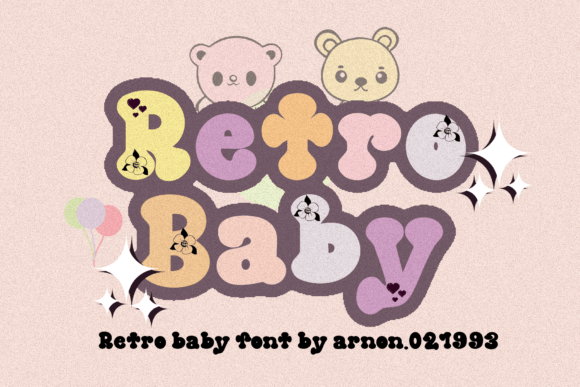
Right away, it clicked. Retro Baby is a display font with gentle rounded terminals, open letterforms, and just enough playful bounce to feel childlike — but never childish in a way that undermines credibility. It’s not a script or handwritten font; it’s a carefully crafted, highly legible sans serif with personality. Think of it as the typographic equivalent of a friendly smile — clear, warm, and instantly disarming.
I tested it across devices: on desktop, the rhythm of its spacing gave the headline breathing room. On mobile, it held up beautifully at 32px — no crowding, no awkward kerning traps. Even over a subtle textured background image, its generous x-height and sturdy stroke weight kept it readable without needing heavy text shadows or overlays. That’s rare for a display font — many sacrifice clarity for charm, but Retro Baby balances both.
In this project, I used it strictly for the hero headline and two key section titles (“What You’ll Gain”, “Your First Step”). Anything more would’ve diluted its impact. Display fonts like Retro Baby shine brightest when used sparingly — as visual anchors, not workhorses. I paired it with Inter (a neutral, highly readable sans serif) for all body copy, buttons, and navigation. The contrast worked perfectly: Retro Baby brought warmth and voice; Inter delivered clarity and calm. No competing personalities — just intentional hierarchy.
This pairing strategy isn’t unique to coaching sites. I’ve seen Retro Baby elevate boutique online stores where product photography leans handmade or nostalgic — think ceramic studios, indie stationery brands, or slow-fashion labels. On their banner banners or “New Arrivals” headers, it adds tactile charm without sacrificing scannability. For course sales pages, it works well above benefit-driven subheads (“Learn at Your Own Pace”, “No Prior Experience Needed”) — reinforcing an inclusive, low-pressure learning environment.
It’s also surprisingly effective in digital brand kits. When clients ask for “a font that feels like us — joyful but grounded”, Retro Baby often lands in the top three candidates. Its design language supports values like kindness, creativity, and accessibility — especially when set against clean layouts and thoughtful whitespace. Just avoid using it for long paragraphs, fine print, or tiny CTAs. Its strength lies in short, high-impact phrases: “Welcome”, “Let’s Begin”, “You Belong Here”, “Just for You”.
Readability checks matter — especially on mobile. I always preview Retro Baby at 24–28px on iOS Safari and Chrome Android. It stays crisp. On dark mode, I lighten the weight slightly or add subtle letter-spacing to prevent visual heaviness. Over light backgrounds, its natural contrast is strong — no need for bold overrides. And because it’s designed with web use in mind, the included WOFF2 files load quickly, even on slower connections.
Before committing, I always verify licensing. Retro Baby is a commercial font — meaning it’s safe for client websites, SaaS dashboards, e-commerce banners, and digital templates you sell. But I double-check whether the license covers variable font usage, multilingual characters (it supports Latin-based languages well), and whether stylistic alternates or ligatures are included. Those little extras can add polish — like a custom ampersand in a logo lockup or a swashy capital “A” for social media graphics.
One thing I appreciate: Retro Baby doesn’t try to be everything. It’s not a variable font with 12 weights. It’s focused — usually offering Regular and Bold, sometimes with a Light or Italic variant. That restraint makes it easier to implement consistently. No over-engineering typography systems. Just one reliable voice, deployed with purpose.
I’ve also used it successfully in portfolio sites for illustrators and designers who want their work to feel joyful and accessible — not overly polished or corporate. On a recent blog redesign for a mindfulness educator, we used Retro Baby only for post titles and newsletter signup headers. Readers told us those moments felt like “a gentle nudge”, not a shout. That’s the UX win: typography that supports emotional tone without demanding attention.
Of course, context is everything. Retro Baby wouldn’t suit a fintech dashboard or a law firm’s homepage — not because it’s “unprofessional”, but because its personality doesn’t align with those audiences’ expectations. But for creators building spaces where warmth and humanity are core to the experience? It’s a quiet superpower.
If you’re choosing a display font for your next digital project, ask yourself: Does it support the feeling you want people to have *before* they read a single word? Does it scale cleanly across breakpoints? Does it pair easily with a functional body font? Does its licensing cover your use case — now and six months from now?
Retro Baby answers yes to all four. It’s not flashy. It won’t win awards for avant-garde design. But it does something quietly essential: it helps digital spaces feel more human — one friendly headline at a time.