Capibara: A Friendly Font for Modern Web Design
I was working on a new project for a boutique online store that sells handmade crafts and stationery. The client wanted something warm, approachable, and visually engaging to match their brand’s personality. I needed a font that felt friendly but still professional enough for an e-commerce site. That’s when I came across Capibara.
A Display Font with Personality
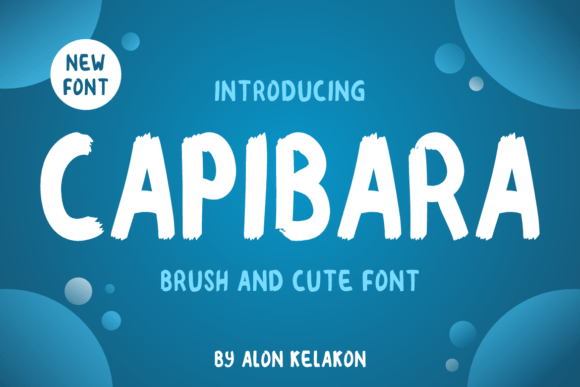
Capibara is a display font that feels like it was designed with a smile. It has a childish, easy-to-read style that immediately conveys friendliness and approachability. The letterforms are rounded and playful, making it feel like it could have been hand-drawn by someone who loves crafting and creativity. Despite its whimsical look, it maintains excellent readability, which is crucial for digital design.
What stood out about Capibara was how well it balanced charm with clarity. In my testing phase, I used it in the hero section of the homepage, placing it over a soft image of a craft table. The contrast between the font and the background made the text pop, while the playful curves kept the tone light and inviting. It wasn’t too bold or too subtle—just right for a brand that wants to feel personal and genuine.
Where to Use Capibara on a Website
Capibara isn’t just for headers—it can be used in various ways depending on the context. For a boutique store, it works beautifully as a headline in product landing pages, call-to-action buttons, and even in promotional banners. I found it especially effective for short phrases like “Shop Now” or “Limited Edition,” where its friendly style helps draw attention without overwhelming the user.
On a portfolio homepage, Capibara can be used for the main title or as a decorative accent in the sidebar. It adds a touch of personality that aligns well with creative professionals who want to showcase their work in a way that feels authentic. I also considered using it for logo text, but I opted for a simpler sans-serif font for the body copy to maintain balance and ensure readability across all screen sizes.
Readability and Responsiveness
One of the biggest challenges with display fonts is ensuring they remain legible on smaller screens and mobile devices. I tested Capibara on several responsive layouts and found that it performed surprisingly well. On a mobile browser, the font scaled smoothly without losing its character, and the rounded edges helped it stand out even at smaller sizes.
For dark backgrounds, Capibara worked well with light-colored text, creating a clean and modern look. However, I noticed that on very light or white backgrounds, the font could become less distinct. To counter this, I recommended adding subtle shadows or adjusting the contrast slightly to maintain readability without compromising the font’s charm.
Font Pairing and Brand Consistency
When pairing Capibara with other fonts, I focused on balancing its playful nature with more serious or structured typefaces. For example, I paired it with a simple sans-serif font like Montserrat for body copy. This combination created a nice contrast that enhanced the visual hierarchy without making the design feel cluttered.
I also experimented with serif fonts for more editorial-style content, such as blog posts or course sales pages. While Capibara’s roundness added warmth, the serif font provided a sense of professionalism and authority. This flexibility makes it a great choice for brands that want to maintain a consistent identity across different types of content.
Technical Considerations
Before finalizing the font, I checked the technical aspects. Capibara comes with multiple weights and styles, which is helpful for varying levels of emphasis. It also supports a wide range of languages, which is important for international clients. Additionally, the font is available as a webfont, making it easy to integrate into any website without worrying about file formats or performance issues.
I also made sure to review the licensing details to ensure it met the requirements for commercial use. Since the client was building an online store, having a font that could be used across all brand assets—from social media graphics to email templates—was essential.
Final Thoughts on Capibara
Capibara is a versatile and charming display font that brings warmth and personality to any digital project. Whether you’re designing a boutique store, a coaching website, or a creative portfolio, this font can help you create a more engaging and approachable brand experience. Its readability, flexibility, and visual appeal make it a valuable addition to any designer’s toolkit.
By carefully considering how and where to use Capibara, you can enhance your website’s usability, aesthetics, and overall user engagement. It’s not just a font—it’s a tool for building stronger connections with your audience through thoughtful typography.