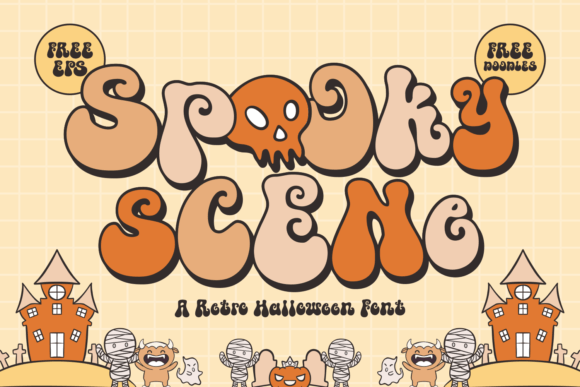
Spooky Scene: A Display Font That Sets the Halloween Mood—Without Sacrificing Clarity
I was halfway through building a landing page for a small-batch candle brand launching its limited-edition autumn collection—and the hero section just felt flat. The imagery was warm, moody, and rich with amber tones, but the headline font lacked personality. I swapped in Spooky Scene, and suddenly the whole layout clicked: playful yet intentional, nostalgic but digitally crisp.
Spooky Scene is a display font that walks a fine line—whimsical curls and gentle bounce give it that unmistakable Halloween charm, but it’s not cartoonish or hard to read. It’s got subtle retro flair (think late-’60s psychedelic posters meets modern UI sensibility), with open counters, generous x-height, and consistent stroke contrast. It doesn’t shout—it invites. And in web design, where first impressions happen in under two seconds, that kind of tonal precision matters.
I tested it across real scenarios: over a textured photo banner, as a sticky header on scroll, inside a mobile navigation drawer, and even as a subtle accent in a product card title. It held up best where it had breathing room—hero headlines, section dividers, campaign banners, and course module headers. On a coaching site’s “October Reset Challenge” landing page, it added warmth without undermining credibility. On a boutique online store’s seasonal promo bar, it made “Pumpkin Spice & Everything Nice” feel curated—not chaotic.
That said, Spooky Scene isn’t built for long paragraphs or dense interface labels. It’s a display font, not a workhorse text face. I kept body copy in a clean, highly legible sans serif (Inter, set at 16px with 1.5 line height) and reserved Spooky Scene for moments where tone needed emphasis: H1s, short CTA buttons (“Grab Your Glow”), blog post titles, and branded social media graphics exported from Figma.
Readability checks were non-negotiable. On mobile, I scaled the font size up—not down—to preserve letterform clarity. At 28px on small screens, spacing tightened slightly, but the curves remained distinct. Over dark backgrounds? No problem—the weight holds contrast well. Over busy image overlays? I added a soft text shadow (1px black at 30% opacity) just once, and it lifted perfectly. No heavy outlines, no awkward masking—just enough lift to keep it scannable.
Font pairing was intuitive. With its friendly irregularity, Spooky Scene pairs beautifully with neutral sans serifs (like Inter, Manrope, or even system fonts like -apple-system) for balance. For a more editorial or artisanal vibe, I tried it alongside a warm, low-contrast serif (Cormorant Garamond light)—and the contrast elevated both. The key is giving the display font space to breathe: never cram it next to dense icons or tight button groups. Let it anchor, not compete.
In practice, I used Spooky Scene for:
- A portfolio site’s “Seasonal Projects” section header—adding character without distracting from the work
- A digital brand kit’s mood board labels (“Mystic,” “Cozy,” “Ritual”)—reinforcing voice at a glance
- A course sales page’s module titles (“Week 1: Set Your Intentions”)—making structure feel inviting
- A blog redesign’s category badges (“Spells & Stories,” “Herb & Hearth”)—small touches with big tonal impact
Before deploying, I double-checked what came in the package: four weights (Light, Regular, Bold, Black), true italics, OpenType features including stylistic alternates and ligatures, and full Latin multilingual support. No missing glyphs mid-sentence. Webfont files were lightweight (WOFF2 only), and the license explicitly covered commercial use—critical when handing off to clients or embedding in SaaS dashboards.
One thing I appreciated: Spooky Scene doesn’t force a theme. It evokes Halloween, yes—but it also works for cozy wellness brands, indie bookshops, apothecary sites, or even playful edtech interfaces. Its magic is in restraint. It’s not a “scary” font; it’s a *spooky*-adjacent one—curious, warm, and human. That nuance helps avoid brand fatigue, especially during seasonal campaigns that run longer than October.
For designers weighing display fonts, here’s what I’d ask: Does it support your hierarchy—or disrupt it? Does it feel intentional in context, or just decorative? Spooky Scene passed both tests. It didn’t need to be everywhere to make an impression. A single well-placed headline, sized thoughtfully and paired with calm supporting type, did more for perceived polish than three different fonts ever could.
If you’re selecting a premium font for a digital brand kit, landing page, or seasonal campaign, treat Spooky Scene like a signature ingredient—not the whole recipe. Use it where users pause, not skim. Where tone matters most. Where a little enchantment makes the experience feel uniquely yours.